YAW · for drift event organizers
Your drift event live on every screen, from the phones already in the cars.
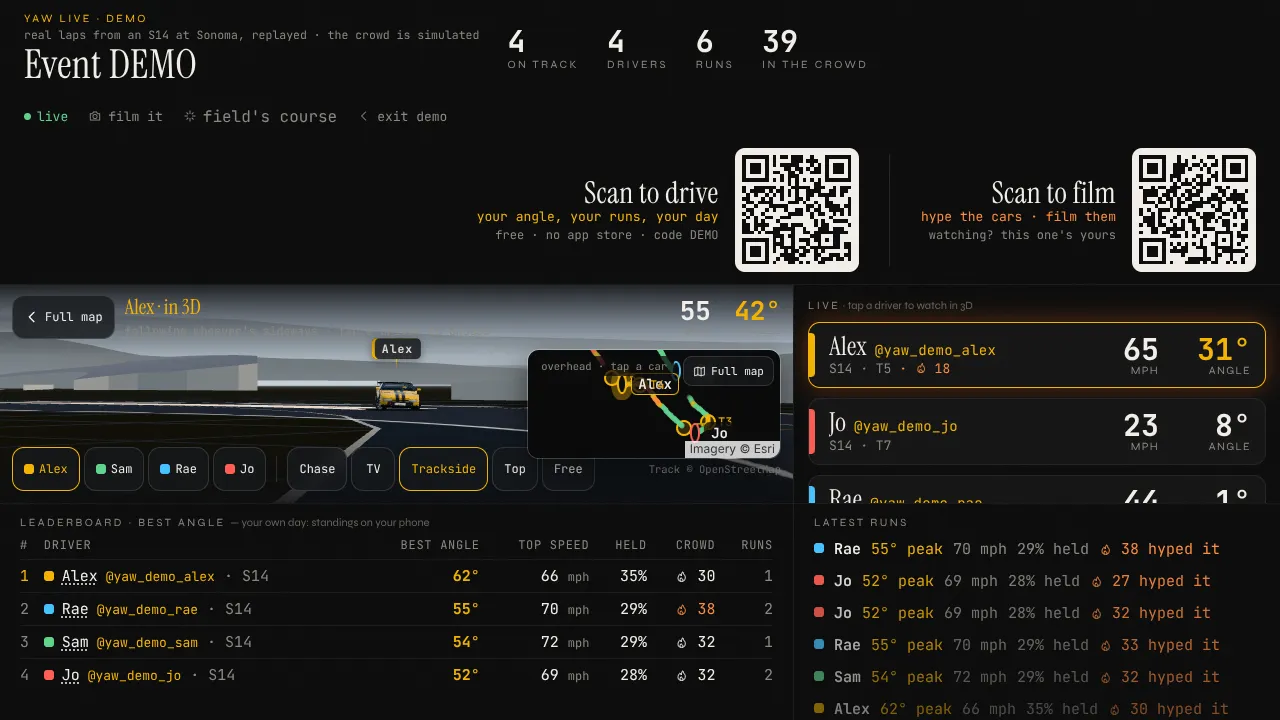
Live timing, a big screen for the pits, judging on tablets, an overlay for your stream, and the results and replays afterwards. You set it up yourself in about 11 minutes. Drivers use it free. A drift competition, a practice day, time attack, a sim night, or a whole season of them.
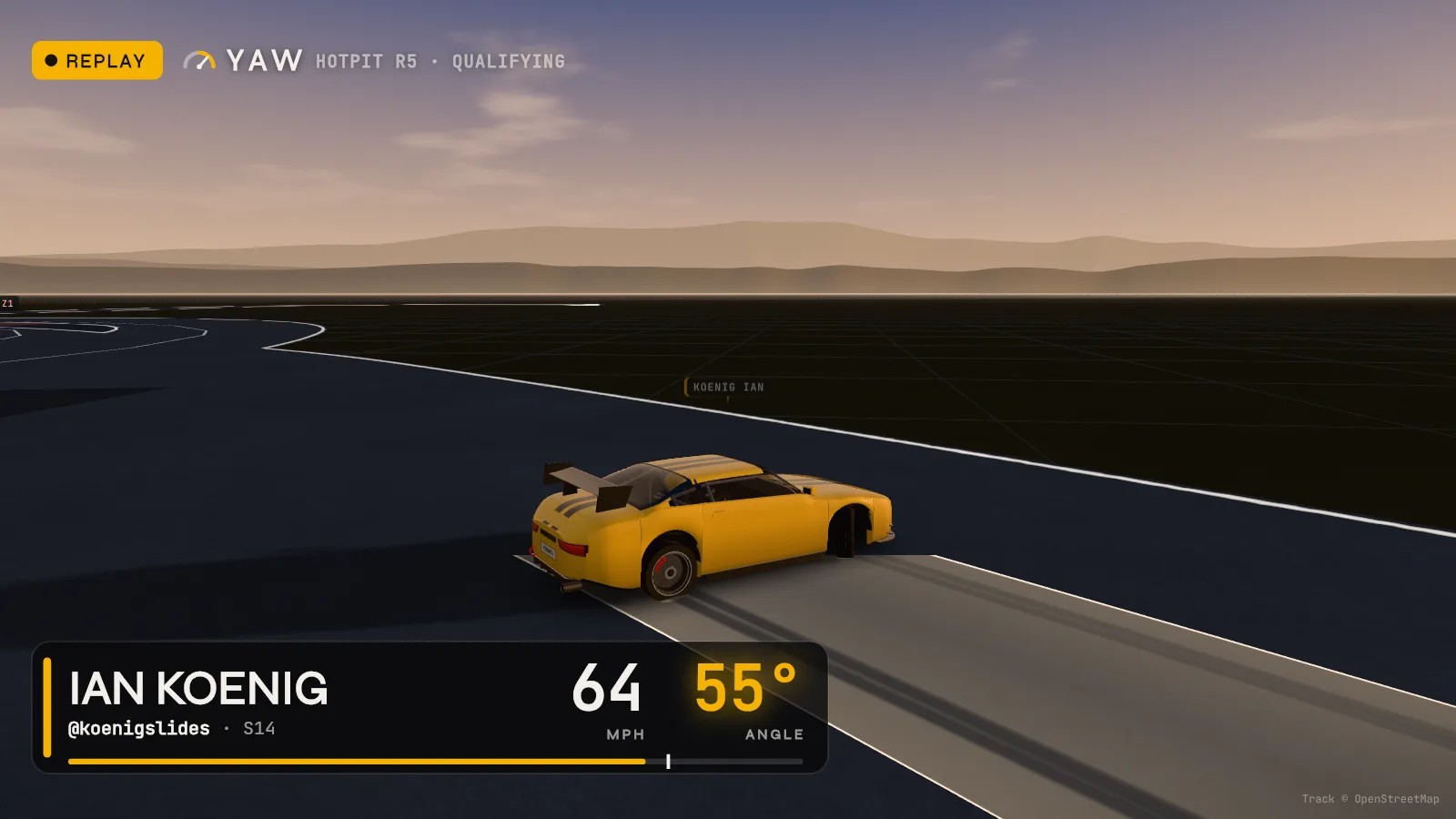
What your crowd and your stream see
The numbers judges argue about, on screen
From “I run a drift event” to results posted
Every step, and you can do it alone
See what YAW does for your eventon your own
Live timing, the big screen, judging on tablets, the stream overlay, results and replays, from the phones already in the cars.
See what it costson your own
Drivers are free. The event kit is priced per event; where no price is set yet, it says ask us.
Below →Your venueon your own
Pick your track from YAW's list. Not on it? Add it with a maps link or your phone at the venue. Track Builder builds it for the sim too.
On the setup page →The course and zoneson your own
Put the track's course on the event, mark your own zones, or find them from the field's practice laps on the day.
On the setup page →The judges' tabletson your own
Your sheet (HOTPIT's or Formula Drift's) and one link for each judge's tablet. Or a practice day with no judges.
On the setup page →The screens and your streamon your own
The big screen for the pits, live timing for the judges' table, and one browser source in OBS for your stream's overlay.
On the setup page →The drivers' join linkon your own
A QR code and the words to send them. They type a name and drive: no app store, no wiring, free.
On the setup page →An online sim qualifier, if you want oneoptional
Drivers qualify in Assetto Corsa or the browser on your venue. YAW scores line and angle, your judges score style, the top drivers go into your bracket.
See it →Event dayon your own
A checklist for the morning: one test car on the map, each judge's tablet in, what to say at the drivers' meeting.
On the setup page →Results and replays afterwardson your own
Wrap up on the big screen: the results sheet to post, the day's recap picture, every battle replayed in 3D, each driver's runs on their phone.
See it →Pay for your eventwith us
Per event, after you've tried it. Nothing takes payment yet: the prices are still being tested, so events run on it now without paying. Leave your email below to hear when it can be paid for.
Below →
What it costs
Free for drivers. Per event for you.
Their own phone and a QR code, for good.
The price we're testing for the big screen, timing, judging, the overlay, results and replays. Nothing takes payment yet, so you can run your event on it now.
No price set yet. Setting one up works now, like the rest.
Later: zone fills with a published margin.
A first guess, not a quote. Later: our cameras and an operator.
Our estimate of what one sells for. You sell "Angle by …" on the overlay and big screen to your sponsors and keep 80%.
Every price here is one we're testing with the first organizers, not a quote. Nothing takes payment yet, so you can set up and run your event on YAW today without paying.
Hear when it's for sale
Leave your email and we'll write once, when the event kit can be paid for.
Only your email and which offer go to YAW, kept for that one message. Privacy
Event day
What you need, and the checklist
Bring
- A laptop or TV for the big screen, with power and internet
- A tablet or phone for each judge, if it's judged
- Drivers' own phones, mounted solid on the dash: nothing to buy or wire in
- OBS on the stream's laptop, if you stream
Before the day
- A screen, power and a stand at the trailerA laptop on a TV by HDMI is enough. Keep it plugged in: it runs all day.
- Internet at the trackEvery screen and phone needs it. If the track's signal is weak, bring a hotspot for the big screen; with none at all, a laptop can be the event's relay on the venue's Wi-Fi (/venue/, npm run venue).
- A tablet or phone for each judge, chargedEach judge's link is theirs: send it to them, or they scan their QR on the day.
- The overlay tried in OBSA browser source at 1920 × 1080. Try it on the demo first (/stream/?demo=1) to see it over your cameras; the full TV graphics package (cards, order, bracket, sponsor slot) is at /tv/.
- Who taps Wrap up at the endThe big screen's organizer panel: it ends the event and makes the results page to post.
On the morning
- One car joined and showed on the mapBefore the drivers' meeting: one phone scans the code and drives a lap.
- Each judge's tablet opened its linkIt remembers them for the day.
- The zones found in practiceOn the big screen: Field's course, then put it on the event before qualifying.
- Said at the drivers' meetingScan the code, type your name, mount the phone solid, start a session before you roll.
The setup page keeps this list for your event and ticks the steps you've done by itself.
Afterwards
Results and replays, the same evening
- The results sheet: every board and the judges' order, with each driver's handle, ready to post.
- The day's recap picture: the podium, the crowd favourite and most improved, for your feed and story.
- Battle replays in 3D: every battle played back pass by pass, with how close the chase stayed.
- Each driver's runs and clips on their own phone, to post and tag your event.
- The sponsor report: each sponsor's time on air, slots and clip plays, one sheet each (a demo).
No signal at your venue? A laptop can carry the whole event on the venue's Wi-Fi and send it to YAW once it's back online: the venue relay. For your stream, the TV graphics are at /tv.
Your setup page links each one for your event once it's made.